
YouTube Manager Steps
You’ve been added as a YouTube admin.
Please follow the steps below to get started.
Step 1 - Please check your personal Google/Gmail email – and “accept” the invitation.
Step 2 - Visit https://www.youtube.com and login with your personal Google/Gmail Account username/password.
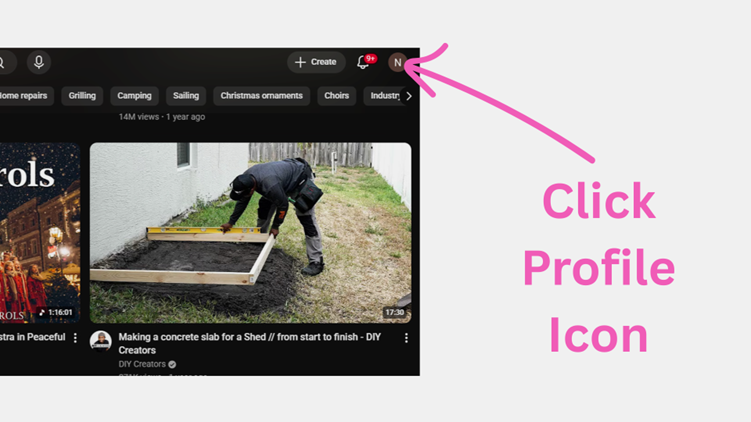
Step 3 - At the top right, click the Profile icon.
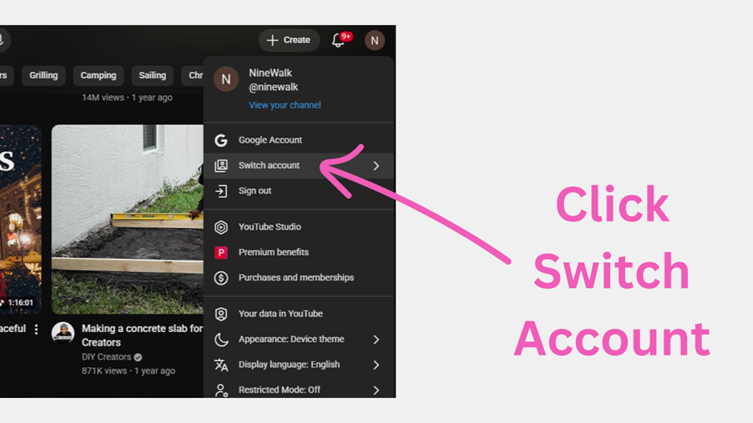
Step 4 - Click "Switch Account"
Step 5 - Click a YouTube Channel you would like to manage
© CityLife Church Melbourne Australia. All Rights Reserved.
We recognise the sovereignty and Lordship of the one true God, revealed through His Son the Lord Jesus Christ, and acknowledge the traditional custodians of the land where we work and live, the Kulin Nation, and pay our respects to Elders past and present.